• Interview Copilot
  • Meeting Copilot
  • Translation in 13 languages

Catch every question. Answer from your own experience. SpeechShield transcribes the interviewer's question as it's asked and, when they finish, shows talking points from your resume and the job posting. In client meetings, the materials you prepared become what you say.

Start with a free account, no card. Connect your own AI and it stays free.

The moment the question ends, your answer is already there.

Here's what happens when a question comes in

When the interviewer stops talking, AI puts an answer on screen by itself. Don't want to wait? Press ⌘↩︎ and get it right away. Try other roles and answer styles too.

Role
Answers
Answer style
Listening

ListeningSuggests when speech pauses

    Answers are suggested when the other person stops talking. Press ⌘↩︎ to get one now, or ⌘K to include your screen.

    Sample resume: Backend engineer · FintechA demo built on a sample resume. The app answers from the resume and job posting you add, and never makes up experience that isn't on your resume.

    Works in Zoom, Meet, Teams and more. No bot joins the call.

    Sound familiar?

    Ever walked out knowing you had a better answer?

    • Your mind goes blank at “Tell me about a time…”

      You've done the work. You just can't pick which project to talk about.

    • You missed half the question and don't want to ask again

      So you answer the half you caught. In a second language it happens even more.

    • The right answer shows up after you hang up

      “I should have mentioned the numbers.” The review always happens after the call.

    SpeechShield is built for these three moments.

    Interview Copilot

    From prep to the interview to the review

    1. Before

      One interview context per company

      Add your resume PDF and the job posting, and set the interview and answer languages separately. You can hear an interview in English and read talking points in your own language.

    2. During

      Talking points are ready when the question ends

      When the interviewer finishes and pauses, talking points appear. Follow-ups build on your earlier answers, and ⌘↩︎ answers right away if you don't want to wait.

    3. After

      See where you got stuck

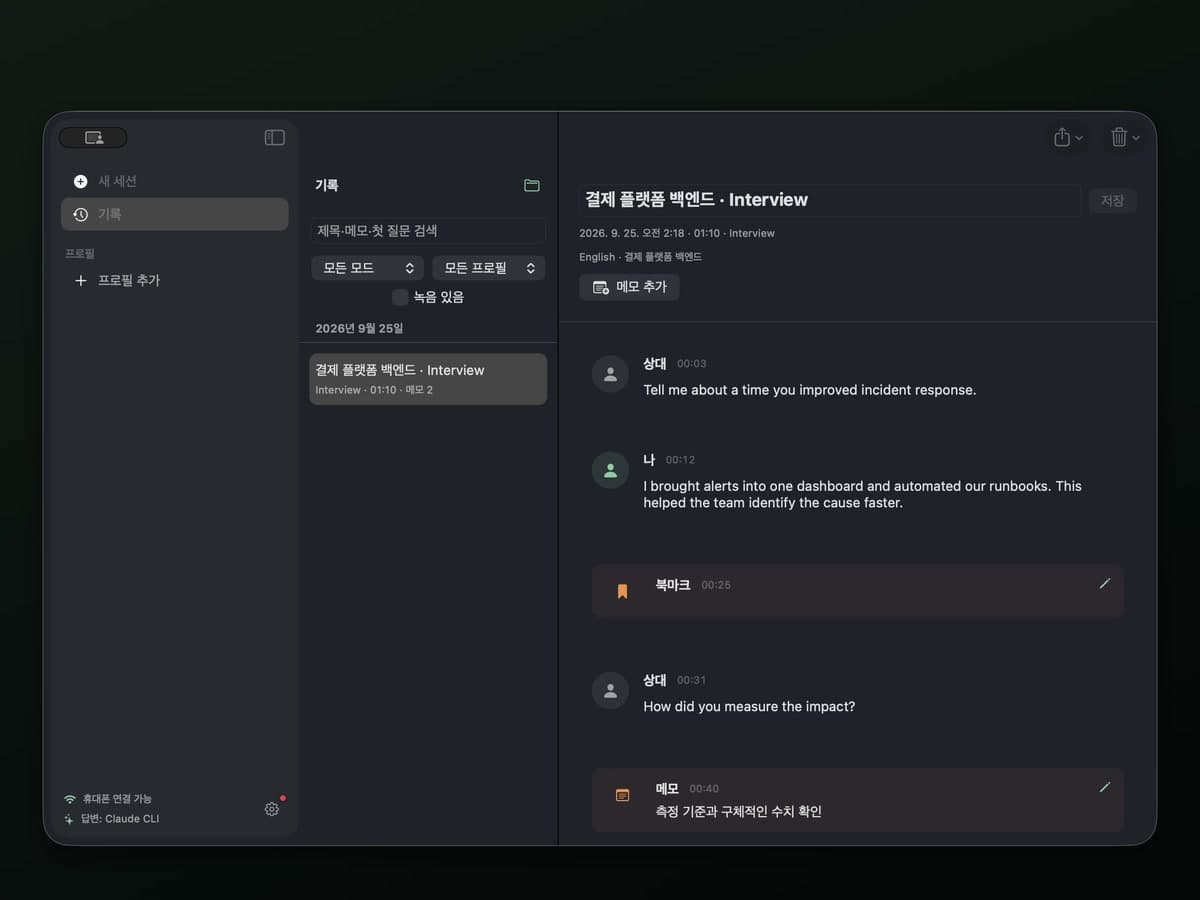
      Questions, suggestions and notes stay in your history in order. If you turned on recording, you can replay from any moment.

    More about Interview Copilot

    Beyond interviews

    For work meetings and calls in another language

    001

    Meeting Copilot

    Add the other company, attendees, your goal and agenda, and proposals, price lists or notes as a meeting context, and SpeechShield suggests what to say based on those materials. Numbers and commitments come only from your materials, tagged with the title of the one they came from.

    • Context per client or project
    • PDF and Word materials
    • Source titles shown
    Learn more
    002

    Live translation

    SpeechShield transcribes meetings and videos and adds the translation under each sentence as it finishes. Translate on your Mac for free, and the audio never leaves it.

    • 13 languages
    • Change languages mid-session
    • Free on your Mac
    Learn more
    003

    Phone viewer

    Scan a QR code and the same session opens in your phone's browser on the same Wi-Fi. If you allow remote control on your Mac, you can also listen, get an answer now and take screenshots from the phone.

    • QR pairing
    • No app to install
    • Remote control

    Where it helps

    Keep it open for moments like these

    • A video interview, talking points on cueInterview Copilot

    • Follow-ups that build on your last answerInterview Copilot

    • A client meeting, the numbers from your materialsMeeting Copilot

    • A weekly sync with an overseas teamLive translation

    • Your phone as a second screenPhone viewer

    • Review a finished interviewHistory and notes

    Why SpeechShield

    Fast. Grounded. Invisible. Yours.

    A late answer is useless. A made-up one is dangerous. A spotted one is game over.

    1. Listening

      Live transcript

      Tell me about a time you disagreed with your team.

      Answers after 1.2 s of quiet
      • Payments revamp: clashed over what to ship first
      • Agreed on criteria using conversion data
      • Shipped 2 weeks early; it became the team norm

      Speed

      Transcribed in 0.6 seconds.

      Words appear live as they're spoken, and each sentence is final within 0.6 s of the speaker stopping. The answer starts on its own, or press ⌘↩︎ for one now.

      • 2026 Proposal.pdf

        ScopePricing15% off annual contracts
      • March notes.docx

        AttendeesDecisionsAgreed 6-week rollout

      “Is there a discount for an annual contract?”

      • Annual contracts get 15% off [2026 Proposal.pdf]
      • Rollout stays on the 6 weeks we agreed [March notes.docx]

      Accuracy

      If it's not in your resume, it doesn't say it.

      Experience, numbers and commitments come only from what you added. In meetings, every line carries its source.

    2. Your screen
      • Lead with 15% off annual
      • Confirm the 6-week rollout
      What they see

      Overlay hidden

      History encrypted on this Mac

      Security

      Zero pixels on their screen.

      The overlay stays out of screen shares, screenshots and recordings. History is AES-256 encrypted and stays on this Mac.

      • SpeechShield
      • This Mac
      • OpenAI
      • Claude Code
      • Codex
      • Ollama
      • Soniox

      Choice

      Bring your own AI.

      The Claude Code or Codex you already use, your own OpenAI key, a local model like Ollama, or this Mac. Pick one each for transcription, answers and translation, with no lock-in.

    Screen sharing and privacy

    Your 100% private copilot

    Get real-time answers without anyone looking over your shoulder. Undetectable on screen share, invisible to screenshots and recordings. Completely yours.

    • Share your entire screen or just one window in Zoom, Meet or Teams. The overlay never reaches the other side, so they see your slides and nothing else.

    Use SpeechShield where AI help is welcome.

    Free plan

    Why pay twice for the same AI?

    Already paying for Claude Code, Codex or an OpenAI key? Plug it in, and live answers, translation, the phone viewer and history run on a free account. No timer, no card. No AI subscription yet? Start right away with SpeechShield AI.

    • The Claude Code or Codex you already use

      Connect the Claude Code or Codex you already subscribe to at no extra cost. With an OpenAI key, you pay the provider directly for what you use.

    • Answers from a local model

      Connect an OpenAI-compatible model running on your own machine, such as Ollama, and answers need no subscription either.

    • Free on this Mac

      Transcription and captions run free on macOS speech recognition and translation. Once the models are downloaded, audio never leaves your Mac.

    • No AI yet? Go Pro

      No key or CLI needed. Start right away with SpeechShield AI, refilled every month, with unlimited contexts.

    Pricing

    Start free, go Pro when you need it

    Free

    For people who bring their own AI

    $0

    • Free account, no card required
    • One-time trial of SpeechShield-hosted AI: 60 minutes and 50 answers
    • Unlimited with your own API key or local CLI
    • 1 interview context and 1 meeting context, 3 sources per meeting context
    • Session history from the last 7 days
    • Recording, phone viewer, screenshot answers
    Download freeGet started

    ProRecommended

    For regular meetings, calls and interviews

    $13.25/mo

    $159 billed yearly

    • SpeechShield-hosted AI: 1,200 minutes and 1,000 answers a month
    • Unlimited with your own API key or local CLI
    • Unlimited contexts and sources, history kept as long as you like
    • Answer translation, hiding from Activity Monitor

    Max

    For back-to-back meetings and interviews all day

    $33.25/mo

    $399 billed yearly

    • Unlimited SpeechShield-hosted AI (fair use)
    • Unlimited with your own API key or local CLI
    • Unlimited contexts and sources, history kept as long as you like
    • Answer translation, hiding from Activity Monitor

    FAQ

    Anything else? Send us an email.

    Can I use it for free?

    Yes. Sign in with a free account and you're on the Free plan. It comes with a one-time trial of SpeechShield-hosted AI, 60 minutes and 50 answers, no card required. Connect your own API key or the Claude or Codex CLI on your Mac to use it without a time limit.

    What are the suggestions based on?

    For interviews, the resume and job posting in the context you make for each company and role. For meetings, the proposals, price lists, notes and other materials in the context you make for each client or project. It never makes up experience that isn't on your resume or numbers that aren't in your materials.

    Can I read suggestions in my own language during an English interview?

    Yes. Each interview context sets the interview language and the answer language separately. SpeechShield transcribes the question in English and gives you talking points in the language you chose.

    Can I use it to practice?

    Yes. Run a mock interview with a friend over video, or play an interview practice video or a voice chat with an AI, and SpeechShield works the same way on whatever your Mac plays. Finished sessions stay in your history with every question and suggestion.

    Will others see it when I share my screen?

    No. The overlay is left out of screen sharing, whether you share your entire display or a single window. For meetings where you'd like an extra layer, open Shareable Screen in Settings → Overlay and share only that window.

    Is SpeechShield fully undetectable?

    SpeechShield has the world's best stealth, with six layers working together. The overlay stays out of screen sharing, whether you share your entire display or a single window. Screenshots and screen recordings skip it, menus and tooltips included. During a session it leaves the Dock and ⌘Tab, and its name and icon are blanked out in Activity Monitor. Read the session on your phone and nothing shows on your Mac at all. And it never adds a bot to the meeting.

    Which devices does it work on?

    An Apple silicon Mac (M1 or later) on macOS 26 or later. Intel Macs aren't supported, and Windows and Linux aren't available yet. Phones connect through iOS Safari or Android Chrome on the same Wi-Fi.

    Where is my data stored?

    Contexts, materials and session history are encrypted on your Mac. Audio and answer requests go only to the AI you choose, and SpeechShield's servers keep only your account, billing and usage.

    Walk into your next interview ready

    Download the DMG, drag it to Applications and sign in with a free account in the app. Make an interview context from your resume and start with a mock interview.

    SpeechShield for Mac

    v0.11.0 beta. Apple silicon Mac, macOS 26 or later. Start free, no card required.

    Start without a card.

    The Free plan comes with a one-time trial of SpeechShield-hosted AI. Connect your own API key for no time limit.

    Change your mind, get your money back.

    Ask within 7 days of paying for Pro or Max and we refund you in full, no questions asked.